VT2020-Http3-Demo: Difference between revisions
Jump to navigation
Jump to search
No edit summary |
No edit summary |
||
| (8 intermediate revisions by the same user not shown) | |||
| Line 5: | Line 5: | ||
[https://gf.dev/http3-test/ https://gf.dev/http3-test] |
[https://gf.dev/http3-test/ https://gf.dev/http3-test] |
||
[[File:Demohttp3.png | 500 px | right]] |
[[File:Demohttp3.png | 500 px | right]] |
||
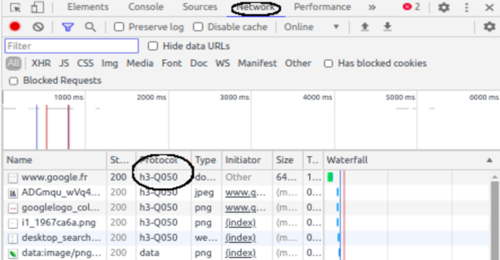
'''On peut aussi vérifier dans le navigateur web:''' |
'''On peut aussi vérifier dans le navigateur web:''' |
||
Dans Chrome/Chromium ou Firefox: Inspecter(ou Crt+Shift+I) --> Onglet Réseau --> Protocole |
Dans Chrome/Chromium ou Firefox: Inspecter(ou Crt+Shift+I) --> Onglet Réseau --> Protocole |
||
| Line 35: | Line 34: | ||
<pre> |
<pre> |
||
sudo apt install libssl-dev python3-dev |
$ sudo apt install libssl-dev python3-dev |
||
//Cloner la librairie aioquic |
//Cloner la librairie aioquic |
||
git clone https://github.com/aiortc/aioquic.git |
$ git clone https://github.com/aiortc/aioquic.git |
||
//Pour pouvoir lance l'example |
//Pour pouvoir lance l'example |
||
pip install -e . |
$ pip install -e . |
||
pip install aiofiles asgiref dnslib httpbin starlette wsproto |
$ pip install aiofiles asgiref dnslib httpbin starlette wsproto |
||
</pre> |
</pre> |
||
| Line 55: | Line 54: | ||
//Lancer le serveur: |
//Lancer le serveur: |
||
python examples/http3_server.py --certificate tests/ssl_cert.pem --private-key tests/ssl_key.pem |
$ python examples/http3_server.py --certificate tests/ssl_cert.pem --private-key tests/ssl_key.pem |
||
//Lancer le client: faire une requête http/3 |
//Lancer le client: faire une requête http/3 |
||
python examples/http3_client.py --ca-certs tests/pycacert.pem https://localhost:4433/ |
$ python examples/http3_client.py --ca-certs tests/pycacert.pem https://localhost:4433/ |
||
//Faire une requête d'une connexion d'un Websocket avec http/3 |
|||
$ python examples/http3_client.py --ca-certs tests/pycacert.pem wss://localhost:4433/ws |
|||
</pre> |
</pre> |
||
'''Observer le trafic avec Wireshark''' |
|||
[[File:Http3request_Wireshark.png]] |
|||
Latest revision as of 09:45, 30 November 2020
Vérification le protocole utilisé d'un site web
Pour vérifier si une site web utilise le http/3:

On peut aussi vérifier dans le navigateur web:
Dans Chrome/Chromium ou Firefox: Inspecter(ou Crt+Shift+I) --> Onglet Réseau --> Protocole
Tester le HTTP/3
On peut tester avec la librairie aioquic écrit en python pour le protocole http/3.
Prérequis
Linux:
$ sudo apt install libssl-dev python3-dev


//Cloner la librairie aioquic

$ git clone https://github.com/aiortc/aioquic.git


//Pour pouvoir lance l'example

$ pip install -e .
$ pip install aiofiles asgiref dnslib httpbin starlette wsproto
Tester l'exemple
cd aioquic

//Lancer le serveur:

$ python examples/http3_server.py --certificate tests/ssl_cert.pem --private-key tests/ssl_key.pem


//Lancer le client: faire une requête http/3

$ python examples/http3_client.py --ca-certs tests/pycacert.pem https://localhost:4433/


//Faire une requête d'une connexion d'un Websocket avec http/3

$ python examples/http3_client.py --ca-certs tests/pycacert.pem wss://localhost:4433/ws
Observer le trafic avec Wireshark
Error creating thumbnail: Unable to save thumbnail to destination