Arcade Cabinet for Tablets: Difference between revisions
Jump to navigation
Jump to search
(Created page with "The goal of this project is to provide arcade-style cabinet for 11-inch tablets. ==Hardware== * 10 mm plywood or MDF * 1 [http://dx.com/p/repair-parts-replacement-4-ways-red-...") |
|||
| (27 intermediate revisions by one other user not shown) | |||
| Line 1: | Line 1: | ||
[[Image:ArcadeCabinetTablet5.jpg|200px|right]] |
|||
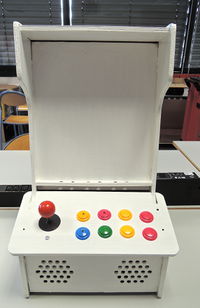
The goal of this project is to provide arcade-style cabinet for 11-inch tablets. |
The goal of this project is to provide arcade-style cabinet for 11-inch tablets. |
||
| Line 5: | Line 7: | ||
* 1 [http://dx.com/p/repair-parts-replacement-4-ways-red-ball-arcade-joystick-with-4-switch-37485 Joystick] |
* 1 [http://dx.com/p/repair-parts-replacement-4-ways-red-ball-arcade-joystick-with-4-switch-37485 Joystick] |
||
* 8 (or less) [http://dx.com/p/repair-parts-replacement-obsf-button-for-arcade-machine-color-assorted-37488 Arcade buttons] |
* 8 (or less) [http://dx.com/p/repair-parts-replacement-obsf-button-for-arcade-machine-color-assorted-37488 Arcade buttons] |
||
* 1 power switch |
|||
* 1 [[Arduino]] Leonardo, Uno, Nano |
|||
* 1 [[Arduino]] Leonardo (better since [http://arduino.cc/en/Reference/MouseKeyboard it can emulate a keyboard or a mouse (HID)]) |
|||
* 1 [[JY-MCU Arduino Bluetooth Wireless Serial Port Module|Bluetooth module for Arduino]] |
* 1 [[JY-MCU Arduino Bluetooth Wireless Serial Port Module|Bluetooth module for Arduino]] |
||
* 2 4-ohms speakers (recycled or [http://www.conradpro.fr/ce/fr/product/300293/Haut-parleur-large-bande-Visaton-FRS-8 not]). |
|||
* 2 recycled Speakers |
|||
* 1 [http://dx.com/p/60w-stereo-audio-amplifier-for-car-motorcycle-golf-cart-red-91350 Audio amplifier] |
* 1 [http://dx.com/p/60w-stereo-audio-amplifier-for-car-motorcycle-golf-cart-red-91350 Audio amplifier] or [http://dx.com/p/2-channel-3w-pam8403-audio-amplifier-board-red-146300 5v Audio Amplifier] |
||
* 1 Android tablet |
* 1 Android tablet |
||
Extra |
|||
* [[Humidity and Temperature Sensor - RHT03]] |
|||
==Design== |
|||
* Figures for laser cutters (PDF and ODG formats) [[Media:ArcadeCabinetTablet.zip]] |
|||
* Electronic Schema ([[Fritzing]]) |
|||
==Software== |
==Software== |
||
===[[Arduino]] sketch=== |
|||
<pre> |
|||
const int NBANABUT = 4; |
|||
const int aButton[NBANABUT] = {A2, A3, A4, A5}; |
|||
const int aChar[NBANABUT] = {'W', 'D', 'A', 'S' }; |
|||
// warning, qwerty keyboard |
|||
// W here gives Z on azerty Keyboard |
|||
//const int aChar[NBANABUT] = {KEY_UP_ARROW, KEY_RIGHT_ARROW, KEY_DOWN_ARROW, KEY_LEFT_ARROW}; |
|||
int aFlag[NBANABUT] = {false, false, false, false }; |
|||
const int NBDIGBUT = 8; |
|||
const int dButton[8] = {2, 3, 4, 5, 6, 7, 8, 9}; |
|||
//const int dChar[8] = {'A', 'B', 'C', 'D', 'E','F','G','H' }; |
|||
// order of button from left to right, line by line |
|||
const int dChar[8] = {'d','h','g','c','f','b','e','q'}; |
|||
int dFlag[8] = {false, false, false, false, false, false, false, false }; |
|||
void setup(){ |
|||
for(int d=0;d<NBDIGBUT;d++) pinMode(dButton[d], INPUT_PULLUP); |
|||
Keyboard.begin(); |
|||
} |
|||
void loop(){ |
|||
for(int d=0;d<NBDIGBUT;d++) { |
|||
if (!dFlag[d] && digitalRead(dButton[d]) == HIGH) { |
|||
dFlag[d]=true; |
|||
}else |
|||
if (dFlag[d] && digitalRead(dButton[d]) == LOW) { |
|||
Keyboard.press(dChar[d]); |
|||
delay(10); // to avoid multiple press |
|||
Keyboard.releaseAll(); |
|||
dFlag[d]=false; |
|||
} |
|||
} |
|||
for(int a=0;a<NBANABUT;a++) { |
|||
if (!aFlag[a] && analogRead(aButton[a]) > 1024/2) { |
|||
aFlag[a]=true; |
|||
Keyboard.release(aChar[a]); |
|||
delay(10); // to avoid multiple press |
|||
} else |
|||
if (aFlag[a] && analogRead(aButton[a]) < 1024/2) { |
|||
Keyboard.press(aChar[a]); |
|||
aFlag[a]=false; |
|||
delay(10); // to avoid multiple press |
|||
} |
|||
} |
|||
} |
|||
</pre> |
|||
===[[Processing]] sketches=== |
|||
** Test |
|||
** Pacman http://www.openprocessing.org/sketch/46944 |
|||
** Space Invaders http://www.openprocessing.org/sketch/6572 |
|||
===[[Javascript]] et HTML=== |
|||
* http://gamejs.org/showcase.html |
|||
==Gallerie== |
|||
[[Image:ArcadeCabinetTablet.png]] |
|||
[[Image:ArcadeCabinetTablet1.jpg|200px]] |
|||
[[Image:ArcadeCabinetTablet2.jpg|200px]] |
|||
[[Image:ArcadeCabinetTablet3.jpg|200px]] |
|||
[[Image:ArcadeCabinetTablet4.jpg|200px]] |
|||
[[Image:ArcadeCabinetTablet5.jpg|200px]] |
|||
Latest revision as of 13:40, 14 February 2014

The goal of this project is to provide arcade-style cabinet for 11-inch tablets.
Hardware
- 10 mm plywood or MDF
- 1 Joystick
- 8 (or less) Arcade buttons
- 1 power switch
- 1 Arduino Leonardo (better since it can emulate a keyboard or a mouse (HID))
- 1 Bluetooth module for Arduino
- 2 4-ohms speakers (recycled or not).
- 1 Audio amplifier or 5v Audio Amplifier
- 1 Android tablet
Extra
Design
- Figures for laser cutters (PDF and ODG formats) Media:ArcadeCabinetTablet.zip
- Electronic Schema (Fritzing)
Software
Arduino sketch
const int NBANABUT = 4;
const int aButton[NBANABUT] = {A2, A3, A4, A5};
const int aChar[NBANABUT] = {'W', 'D', 'A', 'S' };
// warning, qwerty keyboard
// W here gives Z on azerty Keyboard
//const int aChar[NBANABUT] = {KEY_UP_ARROW, KEY_RIGHT_ARROW, KEY_DOWN_ARROW, KEY_LEFT_ARROW};
int aFlag[NBANABUT] = {false, false, false, false };

const int NBDIGBUT = 8;
const int dButton[8] = {2, 3, 4, 5, 6, 7, 8, 9};
//const int dChar[8] = {'A', 'B', 'C', 'D', 'E','F','G','H' };
// order of button from left to right, line by line
const int dChar[8] = {'d','h','g','c','f','b','e','q'};
int dFlag[8] = {false, false, false, false, false, false, false, false };


void setup(){
  for(int d=0;d<NBDIGBUT;d++) pinMode(dButton[d], INPUT_PULLUP);
  Keyboard.begin();
}

void loop(){


   for(int d=0;d<NBDIGBUT;d++) {
    if (!dFlag[d] && digitalRead(dButton[d]) == HIGH) {

      dFlag[d]=true;

    }else
    if (dFlag[d] && digitalRead(dButton[d]) == LOW) {
      Keyboard.press(dChar[d]);
      delay(10); // to avoid multiple press
      Keyboard.releaseAll();
      dFlag[d]=false;
    }
  }


for(int a=0;a<NBANABUT;a++) {
    if (!aFlag[a] && analogRead(aButton[a]) > 1024/2) {
      aFlag[a]=true;
      Keyboard.release(aChar[a]);
      delay(10); // to avoid multiple press
    } else
    if (aFlag[a] && analogRead(aButton[a]) < 1024/2) {
      Keyboard.press(aChar[a]);
      aFlag[a]=false;
      delay(10); // to avoid multiple press
    }
  }

}
Processing sketches
- Test
- Pacman http://www.openprocessing.org/sketch/46944
- Space Invaders http://www.openprocessing.org/sketch/6572
Javascript et HTML
Gallerie
Error creating thumbnail: Unable to save thumbnail to destination


